What you'll get out of this post
The previous post, Why MCP Exists, worked through the theory. This time we build the whole thing by hand, so you can watch the protocol happen line by line in your terminal:
- Spin up a real WordPress with Docker, and use curl to see that "underneath MCP, it's just HTTP"
- Write an MCP server without any MCP SDK, wrapping WordPress in all three primitives: Tools + Resources + Prompts
- Hand-write an MCP client too, with an agent loop driven by the official DeepSeek API
- Actually run "write and publish a post with a cover image for me," with the real JSON-RPC messages and WordPress admin screenshots to prove it
- Finally, plug the same server into Claude Desktop to demonstrate that the protocol really is portable
Why hand-write everything instead of using the SDK
The official @modelcontextprotocol/sdk exists, and in production you should use it. But it hides every wire message from you. The whole point of this post is to see how client / LLM / server cooperate -- so we hand-write both ends and print every single tools/call message. Once you've seen through it, the SDK stops being magic: you'll know exactly what it's doing on your behalf.
The complete, runnable code is on GitHub: github.com/stanleyyylau/wp-mcp. What follows are annotated highlights.
Want to run it yourself? Three steps
git clone https://github.com/stanleyyylau/wp-mcp && cd wp-mcpdocker compose up -dto start WordPress, then runDEEPSEEK_API_KEY=sk-yours ./scripts/setup-wordpress.shto install it and write the credentials into.envnpm install, thennpm run client "publish a post with a cover image for me"
All you need is a DeepSeek API key and Docker on your machine. The repo README has full instructions.
Step 0: Start a real WordPress and see that it's just HTTP underneath
Before writing any MCP code, let's establish the single most important intuition. One docker-compose.yml brings up WordPress plus a database:
services:
  db:
    image: mariadb:11
    environment:
      MARIADB_DATABASE: wordpress
      MARIADB_USER: wordpress
      MARIADB_PASSWORD: wordpress
      MARIADB_ROOT_PASSWORD: rootpass
  wordpress:
    image: wordpress:latest
    depends_on: [db]
    ports: ["8080:80"]
    environment:
      WORDPRESS_DB_HOST: db:3306
      WORDPRESS_DB_USER: wordpress
      WORDPRESS_DB_PASSWORD: wordpress
      WORDPRESS_DB_NAME: wordpress
Once it's up, WordPress ships with a built-in REST API. We authenticate with an
Key Concept
Application Password
Burn this fact in
There is no magic underneath an MCP server. It's an ordinary HTTP client wrapping WordPress's REST API. Every server tool we write from here on ultimately boils down to assembling that curl. Hold on to that, and none of the code below will feel mysterious.
Step 1: What the protocol looks like -- JSON-RPC over stdio
MCP's local transport is stdio: the Host launches the server as a child process, and the two talk over the child's standard input/output. The message format is JSON-RPC 2.0, one message per line (newline-delimited).
stdio transport: Host and server are just parent and child processes
Each message = one line of JSON-RPC; server logs go to stderr and must never pollute stdout
So the first piece of "hand-writing the protocol" is encoding and decoding the JSON-RPC framing (one message per line). This code is shared by both ends:
// src/shared/jsonrpc.ts -- encode a message as "one line of JSON + newline"
export function encode(msg) {
  return JSON.stringify(msg) + "\n";
}

// stdio is a stream: a single read may hand you half a line, or several lines at once.
// This decoder slices the byte stream back into complete messages on \n boundaries.
export class LineDecoder {
  private buffer = "";
  push(chunk: string): string[] {
    this.buffer += chunk;
    const lines = this.buffer.split("\n");
    this.buffer = lines.pop() ?? "";        // the last fragment may be incomplete -- keep it
    return lines.filter((l) => l.trim().length > 0);
  }
}The classic first-timer mistake
With the stdio transport, stdout is the protocol channel and not a single stray byte is allowed on it. Any console.log debug output gets parsed by the client as JSON-RPC and breaks the protocol outright. All logging must go to stderr. That's rule number one of any MCP server.
Step 2: Hand-writing the server's protocol layer
The "whole truth" of the MCP server side is just a switch that dispatches on the method name. No framework -- whatever method the client sends, we answer.
// src/server/protocol.ts (excerpt)
export async function handleRequest(wp, method, params) {
  switch (method) {
    // Handshake: the client opens with initialize; the server reports its capabilities
    case "initialize":
      return {
        protocolVersion: "2024-11-05",
        capabilities: { tools: {}, resources: {}, prompts: {} },
        serverInfo: { name: "wordpress-mcp", version: "0.1.0" },
      };

    case "tools/list":
      return { tools: TOOLS };                       // hand over the tool catalog

    case "tools/call": {
      const { name, arguments: args } = params;
      try {
        const result = await callTool(wp, name, args);  // actually call WordPress
        return { content: [{ type: "text", text: JSON.stringify(result) }] };
      } catch (err) {
        // Note: tool failures don't throw a JSON-RPC error -- they return isError:true,
        // so the LLM can "see" the error and retry with corrected arguments.
        return { content: [{ type: "text", text: String(err) }], isError: true };
      }
    }

    case "resources/list":   return { resources: STATIC_RESOURCES };
    case "resources/read":   return { contents: [await readResource(wp, params.uri)] };
    case "prompts/list":     return { prompts: PROMPTS };
    case "prompts/get":      return getPrompt(params.name, params.arguments);

    default:
      throw Object.assign(new Error(`Not implemented: ${method}`), { code: -32601 });
  }
}
The entry point index.ts is equally plain: read stdin line by line, hand each line to handleRequest, write the result back to stdout. Configuration (the WP URL and credentials) comes from environment variables -- which is why "paste in a URL and a password and you're connected" works: the Host simply passes them as env when it spawns this child process.
// src/server/index.ts (excerpt)
const wp = new WordPressClient({
  url: process.env.WP_URL,
  username: process.env.WP_USERNAME,
  appPassword: process.env.WP_APP_PASSWORD,
});

process.stdin.on("data", (chunk) => {
  for (const line of decoder.push(chunk)) {
    const msg = JSON.parse(line);
    if (msg.id === undefined) continue;              // notifications (no id) need no reply
    handleRequest(wp, msg.method, msg.params)
      .then((result) => send({ jsonrpc: "2.0", id: msg.id, result }))
      .catch((err) => send({ jsonrpc: "2.0", id: msg.id, error: {...} }));
  }
});
That is a complete MCP server protocol layer. We can feed it raw JSON-RPC and watch its actual responses (this is the payoff of skipping the SDK -- every message is visible):
Step 3: Wrapping WordPress in the three primitives
The protocol layer is the skeleton; the three primitives are the flesh. Everything bottoms out in that "HTTP client wrapping the REST API":
// src/server/wordpress.ts (excerpt) -- the foundation everything sits on
export class WordPressClient {
  constructor(cfg) {
    this.base = cfg.url.replace(/\/$/, "") + "/wp-json";
    // Application Password + HTTP Basic Auth
    const token = Buffer.from(`${cfg.username}:${cfg.appPassword}`).toString("base64");
    this.authHeader = `Basic ${token}`;
  }
  createPost(input) {
    return this.req("POST", "/wp/v2/posts", { status: "draft", ...input });
  }
  // ...listPosts / uploadMedia / createMenu / addMenuItem ...
}
Tools (actions): each tool is just { name, description, inputSchema }. The description and inputSchema are written for the model -- they're the only thing it has when deciding which tool to call and what to pass. Which means:
⚡ Iron Rule #1
A tool's description is API documentation for the model
When the model picks the wrong tool or fills in the wrong arguments, nine times out of ten the model isn't dumb -- your description/inputSchema is vague. Write it as if onboarding a smart new hire who knows nothing about your system: what each parameter does, what format it takes, what its constraints are. This is the highest-ROI investment in a hand-written MCP server.
// src/server/tools.ts (excerpt)
export const TOOLS = [
  {
    name: "wp_create_post",
    description: "Create a post. status=publish publishes immediately, status=draft saves a draft (default: draft). content supports HTML.",
    inputSchema: {
      type: "object",
      properties: {
        title:   { type: "string" },
        content: { type: "string", description: "Post body, HTML supported" },
        status:  { type: "string", enum: ["draft", "publish"] },
        featured_media: { type: "number", description: "Media ID of the featured image" },
      },
      required: ["title", "content"],
    },
  },
  // wp_upload_media / wp_set_featured_image / wp_create_menu / wp_add_menu_item ...
];
We expose 11 tools in total, covering creating/updating/deleting posts, uploading media, setting featured images, creating categories, and building menus.
Resources (read-only context): read-only data identified by URIs. For example, exposing site info and posts as wp://...:
// src/server/resources.ts (excerpt)
export async function readResource(wp, uri) {
  if (uri === "wp://site/info") {
    const info = await wp.getSiteInfo();
    return { uri, mimeType: "application/json", text: JSON.stringify(info) };
  }
  const m = uri.match(/^wp:\/\/posts\/(\d+)$/);    // wp://posts/123
  if (m) {
    const post = await wp.getPost(Number(m[1]));
    return { uri, mimeType: "text/html", text: post.content.rendered };
  }
}
Prompts (workflow templates): server-provided templates the user can trigger with one click. Take a "weekly digest" template: it does no work itself, it orchestrates intent -- telling the model "first read wp://posts/recent, then summarize, then call wp_create_post to save a draft":
// src/server/prompts.ts (excerpt)
export function getPrompt(name, args) {
  if (name === "weekly_digest") {
    return {
      messages: [{
        role: "user",
        content: { type: "text", text:
          `First read the resource wp://posts/recent to get recent posts, write a "Weekly Picks" digest, ` +
          `then call wp_create_post to save it as a draft.` },
      }],
    };
  }
}Three primitives, three jobs
See the distinction now: Tools are invoked by the model and change things; Resources are read-only data the application injects into context; Prompts bake "here's how to use these tools" into templates the user can trigger with one click. Put together, that's what makes MCP a "protocol" rather than just "remote functions."
Step 4: Hand-writing the client -- the MCP layer
Now switch to the consuming side. The MCP client inside the Host does three things: spawn the server child process, send and receive JSON-RPC, and pair up async requests/responses into calls you can await.
// src/client/rpc.ts (excerpt) -- this is what the client layer inside Claude Desktop does
export class McpClient {
  constructor(opts) {
    // (1) Spawn our server as a child process, with WP credentials in env
    this.child = spawn(opts.command, opts.args, {
      env: opts.env,
      stdio: ["pipe", "pipe", "inherit"],     // server's stderr passes straight through to the terminal
    });
    // (2) Read the server's stdout line by line, pairing up responses
    this.child.stdout.on("data", (chunk) => {
      for (const line of this.decoder.push(chunk)) this.onLine(line);
    });
  }
  // (3) Each request carries an auto-incrementing id, stored in a pending map;
  //     when the response arrives, look up the Promise by id
  request(method, params) {
    const id = this.nextId++;
    return new Promise((resolve, reject) => {
      this.pending.set(id, { resolve, reject });
      this.write({ jsonrpc: "2.0", id, method, params });
    });
  }
}
The handshake is simple: after initialize, send a notifications/initialized notification, and from then on you can tools/list and tools/call.
Step 5: Wiring in the LLM -- DeepSeek as the brain
This is the most important conceptual layer. We use the official DeepSeek API (OpenAI-compatible function calling) as the brain. Note:
The LLM has no idea what MCP is
DeepSeek doesn't know MCP exists, and it can't touch WordPress. All it understands is OpenAI-style tools declarations. So the client has one core responsibility: translate the MCP tools/list result into function declarations the LLM understands. That translation is the most concrete link in the whole client / LLM / server relationship.
// src/client/deepseek.ts (excerpt) -- MCP tools → DeepSeek function declarations
export function mcpToolsToFunctions(tools) {
  return tools.map((t) => ({
    type: "function",
    function: {
      name: t.name,
      description: t.description,
      parameters: t.inputSchema,            // the two schemas map almost one-to-one
    },
  }));
}
Then comes the agent loop -- the piece that ties all three together. This code is the previous post's data-flow diagram, written out:
// src/client/loop.ts (excerpt)
const tools = mcpToolsToFunctions(await client.listTools());  // (1) fetch tools from the server, translate for the LLM
const messages = [{ role: "system", content: SYSTEM_PROMPT },
                  { role: "user",   content: userPrompt }];

for (let step = 0; step < maxSteps; step++) {
  const reply = await chat(cfg, messages, tools);   // (2) ask DeepSeek
  messages.push(reply);
  if (!reply.tool_calls?.length) return reply.content;  // no more tool calls → wrap up

  for (const tc of reply.tool_calls) {              // (3) the model wants to call a tool
    const args = JSON.parse(tc.function.arguments);
    const result = await client.callTool(tc.function.name, args);  // (4) actually call WordPress via MCP
    messages.push({                                  // (5) feed the result back, on to the next round
      role: "tool", tool_call_id: tc.id,
      content: result.content.map((c) => c.text).join("\n"),
    });
  }
}
The agent loop: a closed circuit of three roles
Results flow back to DeepSeek as role:"tool" → loop until no more tool calls
Wait -- does every model provider need its own translator?
Look at mcpToolsToFunctions again and a sharp question should occur to you: this translation targets DeepSeek's format, which happens to be OpenAI-compatible. But Anthropic's API uses a different tool dialect (input_schema, tool_use content blocks), and Gemini uses yet another. The MCP side of the translation is standardized -- that's the whole point of the protocol -- but the LLM side never was. Each provider invented its own function-calling format, and they still differ today.
So yes: a host that wants to support multiple providers needs one translator per provider dialect. Three things keep this from being a real problem in practice:
- The translation is mechanical and tiny. Look at ours -- it's a field-renaming exercise (
name/description/inputSchemamapped into the provider's shape), about ten lines per provider. Nobody is maintaining a heavy compatibility layer; they're maintaining a handful ofmap()calls. - Most hosts only speak one provider anyway. Claude Desktop translates MCP tools into Anthropic's format and nothing else. Our CLI translates into OpenAI's format and nothing else. One host, one brain, one translator.
- Multi-provider hosts delegate the dialect problem to an abstraction SDK. Tools like the Vercel AI SDK or LangChain already normalize every provider's function-calling format behind one unified interface. A host built on one of those translates MCP into the SDK's format once, and the SDK handles each provider's dialect.
That third point should feel familiar. "Tool-format dialects x providers" is itself a small M x N problem, and the SDK solves it the standard way: one interface in the middle, each side adapts to it once. The pattern shows up at every layer of this stack once you know to look for it.
Step 6: Running it for real -- "one prompt, one post with a cover image"
Everything is in place. One command:
Here is the actual run (excerpted from the terminal, unedited). Watch how DeepSeek plans the steps on its own -- check categories first, then upload the image, then create the post with the featured image attached. Every decision is the model's:
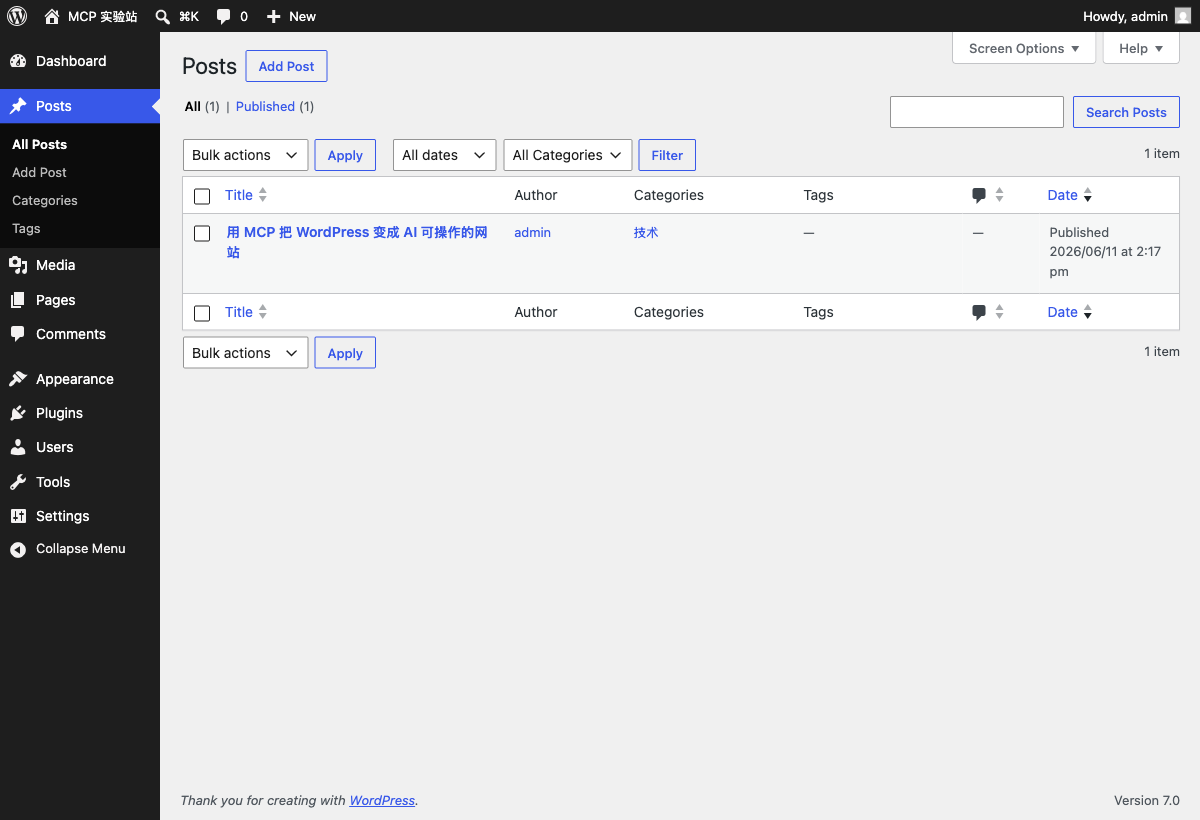
Check the WordPress admin and the post is really there -- category, status, featured image, all of it:
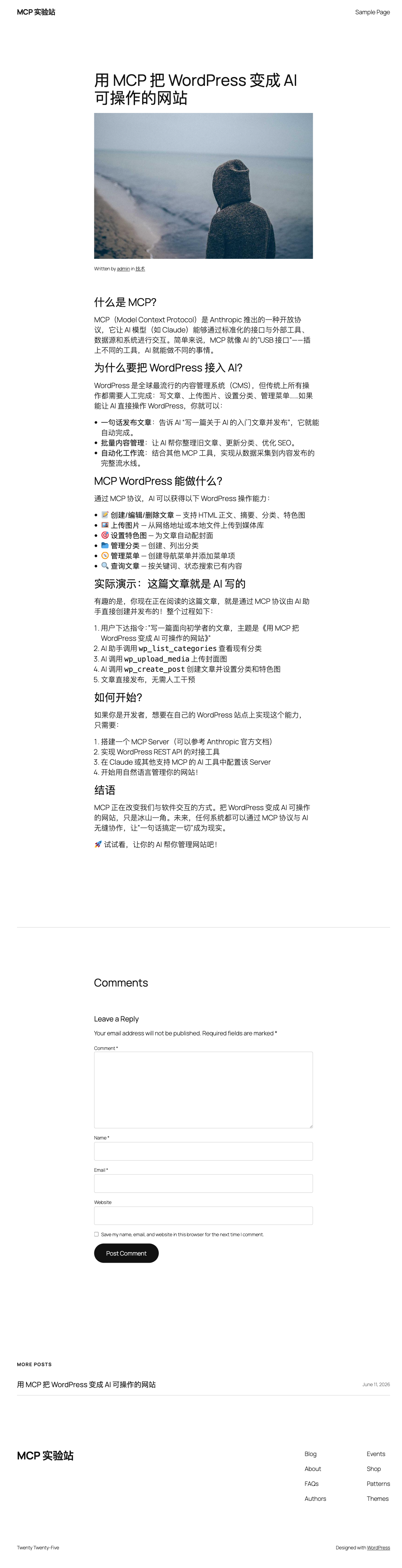
Open the front end, and both the cover image (uploaded by the AI via wp_upload_media) and the body (written by the AI) are in place:
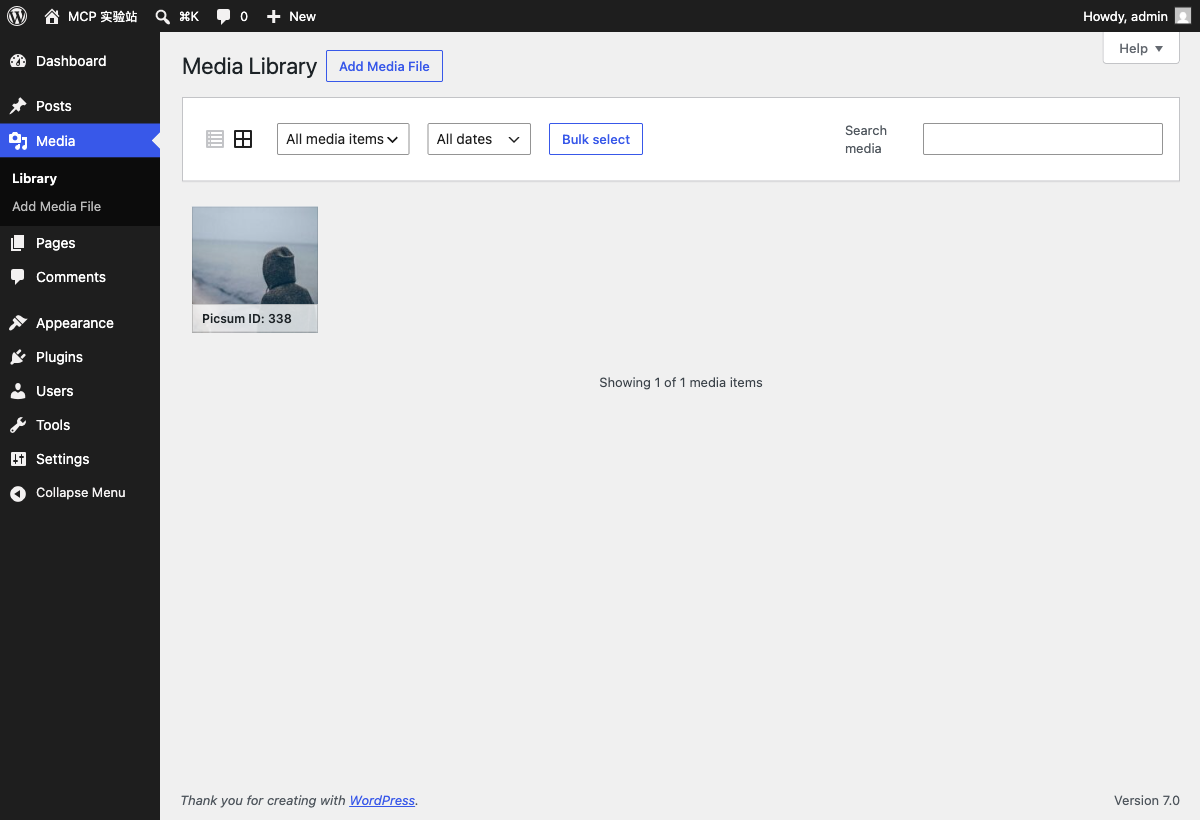
That cover image genuinely landed in the media library too:
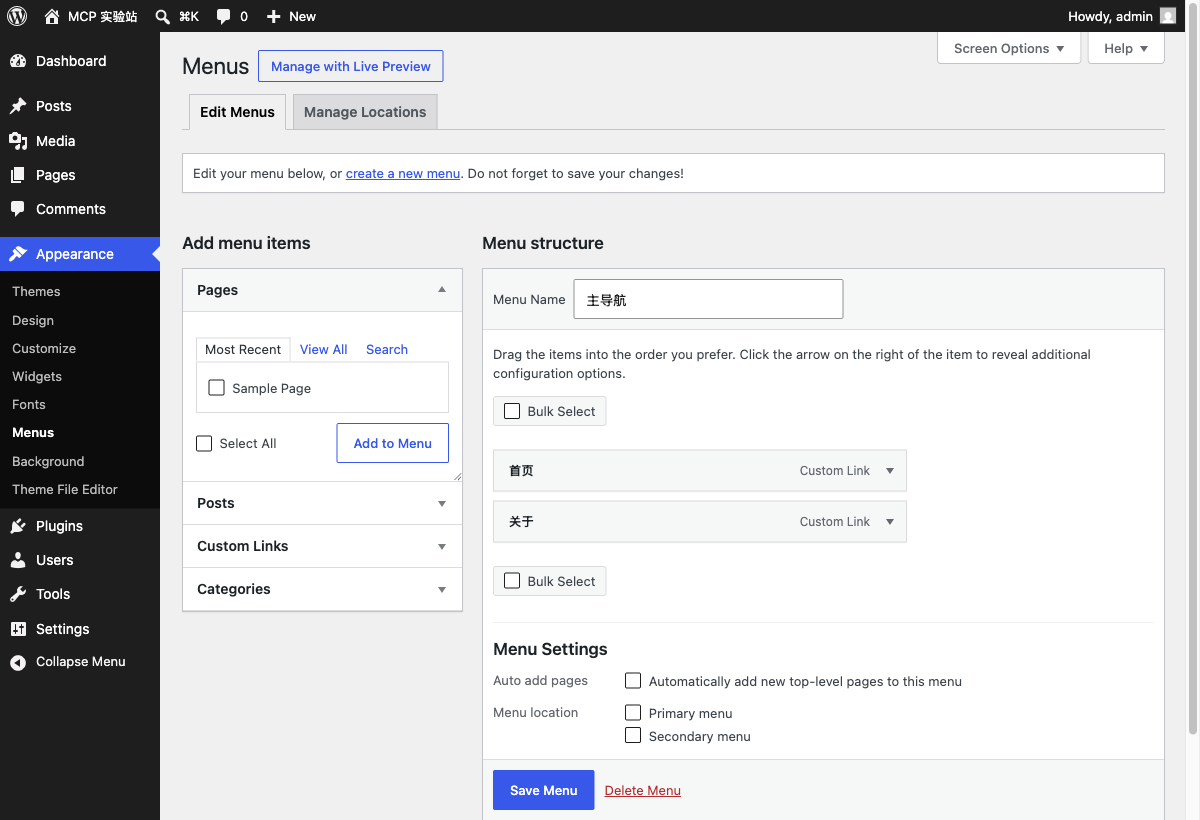
Let's try a different instruction -- building a menu: npm run client "Create a menu called 'Main Nav' with two items: Home -> localhost:8080, About -> localhost:8080/about". DeepSeek called wp_create_menu once and wp_add_menu_item twice, and the admin updated immediately:
Pause and appreciate what just happened
You typed one sentence. DeepSeek decomposed it into "check categories → upload image → create post," deciding on its own which tool to call and what arguments to pass at each step. Our hand-written MCP client translated each intent into JSON-RPC and forwarded it to our hand-written MCP server; the server turned it into real calls against the WordPress REST API. Four roles, cooperating line by line, for real. That abstract data-flow diagram from the previous post -- you just watched it run in your terminal.
Step 7: Plugging the same server into Claude
This is where MCP earns its keep: the server we hand-wrote can be driven by a completely different Host and LLM without changing a single line. Add a block to Claude Desktop's config file, claude_desktop_config.json:
{
  "mcpServers": {
    "wordpress": {
      "command": "npx",
      "args": ["tsx", "/absolute/path/to/wp-mcp/src/server/index.ts"],
      "env": {
        "WP_URL": "http://localhost:8080",
        "WP_USERNAME": "admin",
        "WP_APP_PASSWORD": "your-application-password"
      }
    }
  }
}
Restart Claude Desktop, and it spawns our server as a child process and picks up all 11 tools via tools/list. Then you just tell Claude "publish a post for me," and Claude becomes the brain driving the same server.
Hold on -- the MCP server runs on my machine?
Read that config closely. "command": "npx" means Claude Desktop launches the server as a local child process on your computer and talks to it over stdin/stdout. The MCP server is not in the cloud. Only the resource it manipulates -- WordPress, in our case -- may live on a remote machine. And this isn't a quirk of our toy setup: the majority of MCP servers people run today work exactly this way.
That sounds backwards at first -- wouldn't a cloud-hosted server be more convenient? No install, no paths, no npx? The local-first design is deliberate, for three reasons:
- An MCP server is glue, not a service. Ours is a few hundred lines wrapping a REST API. Hosting glue code in the cloud means deploying it, keeping it up, and securing it -- real operational cost for something that's essentially an adapter.
- Your credentials never leave your machine. Look at the config: your WordPress password sits in a local env var, passed to a local process, used to call WordPress directly. A cloud-hosted server would mean handing those credentials to someone else's machine -- and that server would suddenly need accounts, encryption-at-rest, and a multi-tenant security story.
- Many servers exist precisely to reach local things. Filesystem access, your git repos, your browser, a database on localhost -- the most popular MCP servers expose resources that a cloud process couldn't touch even in principle.
There's also a historical reason: stdio is the protocol's original transport because it needed no networking and no auth spec -- the host fully controls the child process, so "who is allowed to call this server" never comes up. That let MCP ship and spread before the harder questions were answered.
Remote MCP servers do exist, though, and they're growing fast. The spec defines a Streamable HTTP transport plus OAuth-based authorization for exactly this case, and vendors like GitHub and Sentry now host official remote servers -- you connect with a URL and an OAuth consent screen instead of an npx command. The split is straightforward:
Local (stdio) vs. remote (HTTP) MCP servers
| Header | Meaning | Example |
|---|---|---|
Local / stdio | Host spawns the server as a child process; credentials and data stay on your machine | Filesystem, git, our wp-mcp -- anything personal or machine-bound |
Remote / HTTP | Vendor hosts one multi-tenant server; you authenticate with OAuth, no local install | GitHub MCP, Sentry MCP -- a SaaS serving all its customers at once |
The rule of thumb: if the capability is yours (your files, your credentials, your localhost), the server runs next to you; if the capability is a SaaS product, the vendor hosts it once for everyone. Our WordPress server sits in the first camp -- it carries your admin password, so the safest place for it is your own machine.
This is the previous post's claim, made concrete
Our server never knows whether DeepSeek or Claude is on the other side -- it only speaks MCP. Write a server once, reuse it from any Host, with any LLM. That's the entire point of M+N instead of M×N. Claude Desktop / Claude Code / Cursor all play the Host role here (each with its embedded MCP client), bringing their own LLM to the same server.
Iron rules: after building it by hand, remember these three
⚡ Iron Rule #1
Underneath an MCP server are ordinary API calls
Don't let words like "protocol" and "primitive" intimidate you. Peel back an MCP server and you find an ordinary client wrapping an existing REST API or SDK. Our wp_create_post is, at bottom, the curl from Step 0. Get it working with curl first; wrap it in MCP second.
⚡ Iron Rule #2
The client's core job is translation
The LLM doesn't speak MCP; the server doesn't speak LLM. The client inside the Host performs two translations: the server's tools/list into the LLM's function declarations, and the LLM's tool_call into the server's tools/call. Once you see this translation layer clearly, the client / LLM / server distinction snaps into focus for good.
⚡ Iron Rule #3
A capability earns MCP packaging only when it gets reused
This one server is driven by both our DeepSeek CLI and Claude Desktop without changing a line -- that's MCP's payoff. If your capability only ever serves one application, writing tools directly is the better deal. Earn the M+N reuse case first, then reach for MCP.
Security note (do read this)
"Paste in a URL and a password and you're connected" feels great -- but flip it around: this server (and the model driving it) can now do anything to your site with those credentials. For experiments, use a local or staging site, an Application Password you can revoke independently, and a low-privilege account. Don't hand your production admin credentials to a model that can be talked into things by prompt injection.
The previous post explained the why; this one ran the how end to end. MCP isn't mysterious: a protocol layer that decouples "tool providers" from "tool consumers," sitting on top of the most ordinary API calls imaginable. With both posts under your belt, you won't just know how to use MCP -- you'll know when to use it, and when plain function calling is all you need.
👈 If you haven't read part one: Why MCP Exists: From Hard-Wiring Tools into Agents to a Standard Protocol